NOTE: The following article was first published on the now-defunct EduTechGuys WordPress site. The text was recovered from the WayBackMachine on the Internet Archive. Most of the embedded images are lost because Archive.org does not preserve images over certain file sizes. I am posting here so I have an accessible copy of it. Any red boxes in the posted images were added by me to protect personal information.
A Chat with MrChikri via Celebrity’s Hacked Twitter Account
by David | Nov 9, 2016 | General Education, Interview, Quick Tip | 0 comments
by David | Nov 9, 2016 | General Education, Interview, Quick Tip | 0 comments
While following my Twitter feed earlier today, I saw a post from Dave Coulier (yes, as in “Uncle Joey” from “Full/Fuller House”) saying that he had some important news. I responded, not sure I qualified as a “News Reporter.” The account responded, letting me know they had hacked the account and wanted to talk about how they did it and what people can do to protect their accounts.
I struck up a conversation with a user going by the name of “MrChikri.” MrChikri said he was from London.
What follows is the transcript of that conversation (Note: all spellings, grammar, etc are left in tact from the transcript):
davidinark: So, you hacked a celebrity account and I reached out in reply (honestly not realizing it had been hacked). Can we talk about HOW you managed to hack the account, and then, more importantly, how do celebrities (and anyone else) protect themselves from being hacked?
After several moments of waiting, little dots began pulsing on the screen as MrChikri typed out an answer. The response came a full 7 minutes after my initial questions.
MrChikri: hackers that hack celebrities social media accounts are all using the same method, anyone can use this method to hack celebrities even you. all it takes is access to one website called http://leakedsource.com and money for a subscription.
MrChikri: when big sites like linkedin, myspace etc gets hacked http://leakedsource.com gets the database of the site and in the database it includes passwords,emails,usernames
MrChikri: i searched daves email on leakedsource and it gave me a list of sites that the email has been registred to
MrChikri: i have a subscription on leakedsource so let me show you a screenshot of how it can look like when getting the password.
davidinark: Ok, what does that look like?
MrChikri: even if you dont have a subscription on leakedsource you can still search emails,usernames but you won’t be able to see the info on it
davidinark: Feel free to block out passwords, etc.
MrChikri then posted the following image (note, all red boxes were added by me, davidinark):
(IMAGE NOT PRESERVED)
MrChikri: here is dave, myspace got hacked 2013 and over 360M passwords were leaked and as you can see daves was one of them
davidinark: Wow!
MrChikri: if you have a subscription this is how it will look like:
(IMAGE NOT PRESERVED)
davidinark: So, this means that Dave hadn’t updated his password since at least 2013!?
MrChikri: yes sir
MrChikri: most celebs use same passwords on all social media
MrChikri: i managed to get into daves instagram account with 500K followers
MrChikri: because he have been using the same passwords for his social media wich is very bad to do
davidinark: Yoy. Yes, that is VERY bad thing to do. I can only suppose that people get relaxed and assume everything is safe. They leave their passwords the same for years and never realize how exposed they have made themselves.
MrChikri: people like kylie jenner, katy perry, drake etc have been hacked using this method.
MrChikri: my tip is just change your password every month and don’t use same passwords on same social medias, also make sure you enable “Login Verification” on twitter and “2 Step verification on your emails” and “2 Factor Authentication” on your instagram
davidinark: I have to ask what keeps you from doing bad things on their accounts? Why are you willing to expose the problem and talk about it rather than cause absolute havoc, as many hackers would normally be apt to do?
davidinark: Your advice is spot on! I hope you are able to communicate that to the celebrities and others who AREN’T updating/changing their info!
MrChikri: well tbh i tweet crazy stuff to it just depends who the person is,
davidinark: Haha, nothing malicious, just crazy, eh?
MrChikri: i mainly hack accounts just to promote my instagram & snapchat, never my twitter cause i just got suspended today thats why im dming you off this one
davidinark: I assumed this was a burner account. 🙂
MrChikri: instagram is very easy to hack though you won’t belive it
MrChikri: lol
MrChikri: you heard about One Direction?
davidinark: Getting hacked? No. What happened there?
MrChikri: instagram should patch this way to hack accs cause this is just (ridiculous)
MrChikri: all you have to do is this
MrChikri: google “instagram report hacked account” and go to that link, https://www.facebook.com/help/instagram/contact/740949042640030 … and this should come up
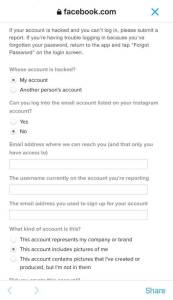
MrChikri: so then u just put ur username and etc
MrChikri: 5-10 mins after you will recieve an email saying this
(IMAGE NOT PRESERVED)
MrChikri: so this might seem hard but it is very simple, i putted in @twhiddleston ‘s instagram account to get into it, and then googled “Tom hiddleston holding a paper”
MrChikri: i found this and it matches the instagram email that they want me to do
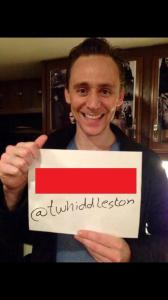
MrChikri: then i just photoshopped the picture as you can see it does look legit
MrChikri: i sent that pic to them and after 17 hours i got this email
(IMAGE NOT PRESERVED)
davidinark: Very legit! (In response to the “legit” comment above)
MrChikri: they gave me a link to reset the password and then i got into his account
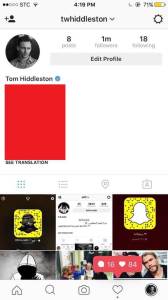
MrChikri: this is how dumb instagram is!
davidinark: Yeah, I can see where that wouldn’t be hard to do at all. So, how would someone stop that from happening to themselves?
MrChikri: if you go into your instagram settings and scroll down til you see “Two-Factor Authentication” and enable that, do you know what that is?
davidinark: Yeap! (**See below)
MrChikri: yes that’s what you need to do enable that, but i know a way to bypass that
MrChikri: i can only bypass it on instagram
davidinark: Definitely need that enabled on any accounts that offer it.
davidinark: I appreciate you taking the time to explain how it is done, but even more that you are interested in helping folks PREVENT it in the first place.
MrChikri: there is one more thing i need to say about twitter hacking. On twitter someone hacks you, you’re first changing the password right and then think that the hacker got logged out of the acc cause you changed the pass
davidinark: Right…
MrChikri: but when changing a twitter password you need to goto “Apps connected” and revoke every device from the account
MrChikri: then the hacker gets logged out
MrChikri: now dave got his account back but he only changed his password, i still have access to his twitter…
davidinark: Ah! Yeah, I bet most folks don’t know about that or even think about that!
MrChikri: literally no one that i’ve hacked does that lol
davidinark: Well, I am glad I reached out to Dave’s (er, your) tweet. Thank you for sharing HOW the accounts get hacked and how folks can PREVENT it from happening in the future.
I then asked MrChikri to look up my account information in the system to see if I was in there. I was. Luckily, the information turned out to be stale (old), but MrChikri’s advice is spot-on: Change the info anyway!
**NOTE: Two-Factor Authorization is a security measure in which verification takes place using TWO forms of ID. This usually entails using a cell phone number that receives a text with a special code to be entered for verification. The user gets a text from the site. If everything is on the up-and-up, the user enters that code on the site. If a user gets a request to enter the code but they never asked for the code, someone is trying to hack the account.


