Showing posts with label network. Show all posts

May 5, 2021

Windows 10 Prints Only One Copy

tldr; Change the Print Driver to "Windows Software Printer Driver"

 I had a user with an issue where their Windows 10 computer would only print ONE copy of a document regardless of how many copies they specified. 

I researched the problem and found that for anyone using HP, there is usually an option under Device Settings to disable Mopier. That's great of you are using an HP. But, this person was using a Lexmark MFP network device. So, no Mopier setting.

The computer did NOT have the Lexmark Universal Driver installed. Frankly, that probably would have solved the problem. Instead, the system had found the printer and installed the driver using the Microsoft Windows IPP Class Driver:


The ultimate solution was to change from the Windows IPP Class to the Microsoft Software Printer Driver:
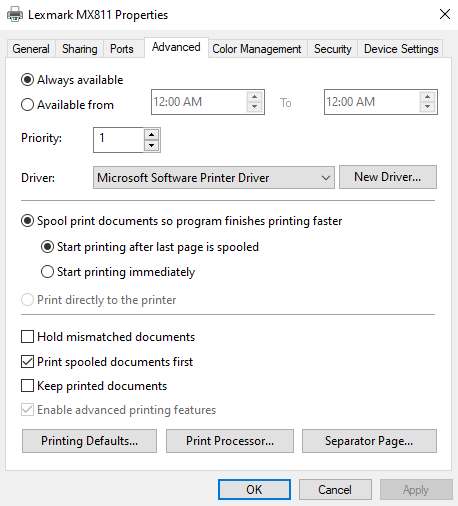

This allowed the user to print all the copies desired.

Jan 22, 2019

#Ransomware Attack at School Triggers Best Practice Reminders

 
Recently, there was a ransomware incident at a nearby school district. The event occurred through a Remote Desktop Protocol Session (RDP) running on the Technology Coordinator's desktop. His machine had a publicly accessible RDP IP address so he could work from home, etc. Unfortunately, his computer was compromised and subsequently used to attack their servers.

If you are using RDP to get access to your network from outside, I recommend the following:
  1. Kill all RDP sessions accessible from outside your internal network. This may require editing your firewall settings to remove the public IP address(es) to your RDP computers.
  2. Change your password on any accounts used for accessing public RDP. The current en vogue system is to use passphrases rather than passwords.
  3. If you must have remote access, set up a VPN to handle that instead of RDP.Several companies offer secure VPN access.
  4. Do NOT put your own login account into the Domain Admins group.
  5. For internal RDP sessions, do *NOT* save the logon credentials. I know it is a pain, but better safe than sorry. :-)

Apr 18, 2018

Work Life: IP Address range Calculator

November 30, 2012
Need a quick way to find the IP address range for a network? There is an online calculator here:
You enter any address on the network, then input the subnet mask, tell the page to calculate the range and Voila! It will give you the 1st address in the range, the last address in the range and the broadcast address.